There is a particular kind of bug that costs you a full evening, walks past every tool you trust, and turns out to be a single character. This is one of those.
We were finishing a migration of an iOS app’s release pipeline. The new flow used mise for tooling, xcodebuild for archiving and exporting, and the App Store Connect API key for signing and upload, with no Ruby or fastlane in the loop. The very last step, altool --upload-app, kept rejecting the IPA:
ERROR ITMS-90035: Invalid Signature. Code failed to satisfy specified
code requirement(s). The file at path "MyApp.app/MyApp" is not
properly signed. Make sure you have signed your application with a
distribution certificate, not an ad hoc certificate or a development
certificate.
The message could not be more confident, or more wrong. The certificate was a valid Apple Distribution, issued by Apple, with the expected chain and the expected iOS Distribution extended key usage. The cert chain validated. codesign -dvv reported the right authority and the right team identifier. And yet ASC said it was not a distribution certificate.
What ASC actually checks
When the App Store Connect upload pipeline receives an IPA, it does not just inspect the leaf certificate. It runs codesign --verify --deep --strict against the embedded signature and asks one specific question: does the signature satisfy its own designated requirement?
A designated requirement is a small expression embedded inside every Mach-O signature. It declares the conditions a verifier should check before trusting the signature. A typical one looks like this:
designated => anchor apple generic
  and identifier "it.example.app"
  and certificate leaf[subject.CN] = "Apple Distribution: ExampleCo (ABCDE12345)"
  and certificate 1[field.1.2.840.113635.100.6.2.1] /* exists */
The verifier reads the signing cert chain, checks that the leaf cert’s common name (CN) matches the string the requirement says it should be, that the intermediate cert carries the right Apple OID, and that the chain anchors at Apple’s root. If any of those checks fails, you get back “does not satisfy its designated Requirement”.
The clue was already there in the local codesign --verify output:
$ codesign --verify --deep --strict MyApp.app
MyApp.app: valid on disk
MyApp.app: does not satisfy its designated Requirement
Valid on disk, but does not satisfy the requirement it embedded itself. That is a self-contradiction, and it deserves an explanation.
Two ways to write the same letter
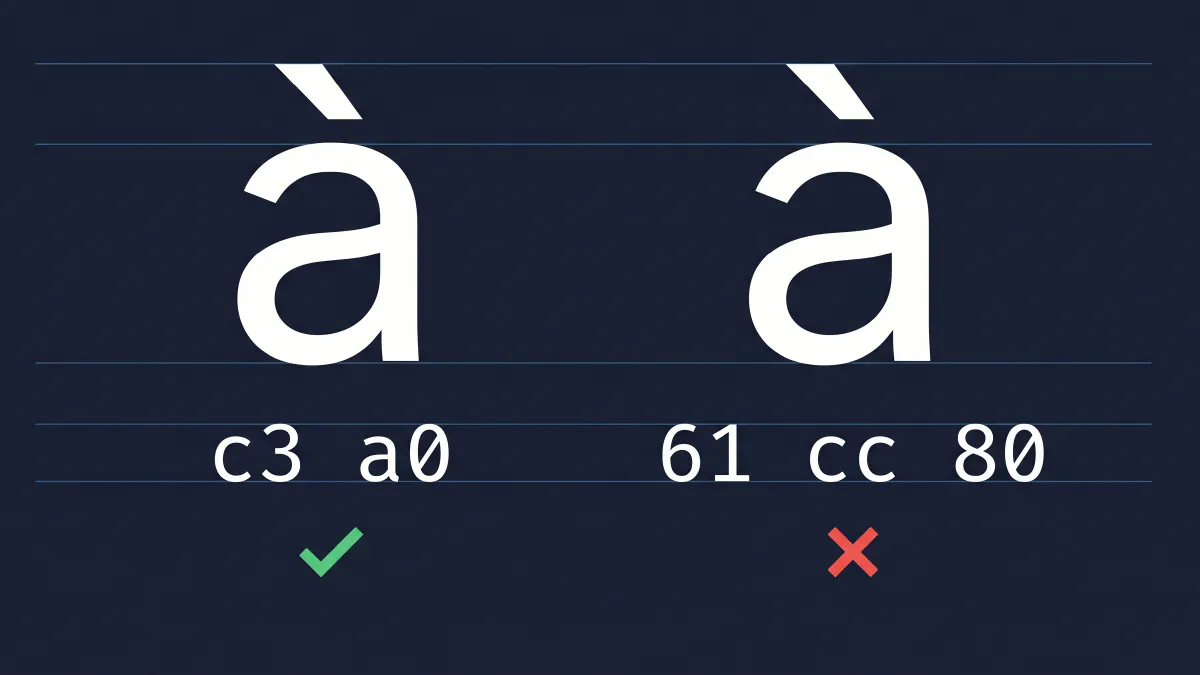
The team is named Synesthesia srl Società Benefit. The relevant part is Società, with a grave accent on the final a. Unicode has two ways to encode that:
- NFC, the precomposed form: a single codepoint
U+00E0(à), encoded in UTF-8 asc3 a0. - NFD, the decomposed form: a base letter
a(U+0061) followed by the combining grave accentU+0300, encoded in UTF-8 as61 cc 80.
Visually they are indistinguishable. To a byte-comparing verifier they are not.
To check which form was where, you can extract both. The cert subject CN comes from the leaf certificate as ASN.1, decoded by OpenSSL:
openssl x509 -in cert.der -inform DER -noout -subject
# subject=UID=...,CN=Apple Distribution: ... Società Benefit ...,...
OpenSSL prints the NFC form. The relevant byte sequence for Società is 53 6f 63 69 65 74 c3 a0.
The designated requirement string, on the other hand, is dumped by codesign itself:
codesign -d -r- MyApp.app
# designated => ... certificate leaf[subject.CN] = 0x4170706c652044697374...
That hex string is the bytes codesign expects to see in the cert’s CN at verification time. The relevant sub-sequence here was 53 6f 63 69 65 74 61 cc 80.
The same name, but the cert is in NFC and the requirement embeds it in NFD. At byte 42 the comparison fails. The signature is valid in every other way: chain, dates, OIDs, hashes. It just does not satisfy the literal byte equality its own designated requirement asks for.
ASC reports this with the catch-all “not a distribution certificate” message. It is technically true (the cert that satisfies the requirement does not exist), but it is so unhelpful that you can spend hours looking at signing identities, certificate types, and provisioning profiles before you think to look at the requirement string itself.
Why now and not before
The exact same pipeline scripts had run for years against other teams I worked with, none of which had ever produced this error. Their names were all pure ASCII: short, no accents, nothing exotic. The new identity was the first one in my keychain whose CN contained a precomposed character.
The bug had been there the whole time, dormant, waiting for a team name that contained a precomposed accented character. The migration to the new pipeline did not cause it. The team name did.
If you are reading this from a country where company names routinely include accented characters (the Italian “Società per azioni” being a particularly common offender), this likely affects you and you have not noticed yet.
A workaround that does not require Apple to fix it
A designated requirement does not have to reference the certificate’s CN. CN is the default codesign chooses, but it is not the only way to identify the signer. Every Apple Distribution certificate has a subject.OU field that contains the team identifier, a ten-character string like ABCDE12345. Team identifiers are ASCII by definition: they cannot contain accented characters.
A requirement that uses OU instead of CN looks like this:
designated => anchor apple generic
  and certificate leaf[subject.OU] = "ABCDE12345"
  and certificate 1[field.1.2.840.113635.100.6.2.1] /* exists */
This expresses the same trust constraint (the binary must be signed by our team’s Apple Distribution certificate, chained through Apple’s standard intermediates) without going anywhere near the Unicode pitfall.
The workaround is to re-sign the binaries inside the IPA with a custom designated requirement that uses the OU form, immediately after xcodebuild -exportArchive produces the IPA and before the upload step. codesign accepts a requirement either as inline source or as a file path. The file path version is the most readable:
cat > /tmp/req.txt <<'EOF'
designated => anchor apple generic
  and certificate leaf[subject.OU] = "ABCDE12345"
  and certificate 1[field.1.2.840.113635.100.6.2.1] /* exists */
EOF

# Frameworks first (codesign requires inside-out signing order)
for fw in MyApp.app/Frameworks/*.framework; do
    codesign --force \
             --sign "Apple Distribution: ExampleCo (ABCDE12345)" \
             -r /tmp/req.txt \
             --timestamp=none \
             "$fw"
done

# App extensions next, each with its own entitlements
for ext in MyApp.app/PlugIns/*.appex; do
    EXT_ENT=$(mktemp).plist
    codesign -d --entitlements :- "$ext" > "$EXT_ENT" 2>/dev/null
    codesign --force \
             --sign "Apple Distribution: ExampleCo (ABCDE12345)" \
             --entitlements "$EXT_ENT" \
             -r /tmp/req.txt \
             --timestamp=none \
             "$ext"
done

# Main app last, with its entitlements
MAIN_ENT=$(mktemp).plist
codesign -d --entitlements :- MyApp.app > "$MAIN_ENT" 2>/dev/null
codesign --force \
         --sign "Apple Distribution: ExampleCo (ABCDE12345)" \
         --entitlements "$MAIN_ENT" \
         -r /tmp/req.txt \
         --timestamp=none \
         MyApp.app
After this, codesign --verify --deep --strict reports both “valid on disk” and “satisfies its Designated Requirement”. The IPA is then repackaged (ditto -c -k -X --keepParent --sequesterRsrc Payload MyApp.ipa) and uploaded. App Store Connect accepts it.
A couple of edge cases are worth knowing about:
codesigndoes not accept the@/path/to/filesyntax that some Apple documentation suggests. The argument to-ris taken as a file path by default (text or binary, auto-detected) or as an inline expression if it begins with an equals sign. There is no@prefix.- Newer macOS versions will silently re-apply
com.apple.FinderInfoextended attributes to bundles under~/Desktopor~/Documentswhile you are working, which trips upcodesign --strict. Doing the re-sign inside/tmpavoids this on most setups. - Each binary needs its entitlements re-passed at re-sign time. Extracting them via
codesign -d --entitlements :-and feeding them back in keeps the embedded entitlements stable.
Wiring it into CI
The whole rescue dance is conditional. For a team whose name contains no accented characters, the first codesign --verify --deep --strict after export passes cleanly and there is nothing to do. The trick is to run it always, and only intervene if it fails:
# After xcodebuild -exportArchive produces the IPA:
unzip -q "$IPA_PATH" -d "$EXTRACT_DIR"
APP_PATH=$(find "$EXTRACT_DIR/Payload" -maxdepth 1 -name "*.app" -type d | head -1)

if ! codesign --verify --deep --strict "$APP_PATH" >/dev/null 2>&1; then
    # Re-sign with OU-based requirement, then repack the IPA.
    ...
fi
The auto-detect approach turns the workaround into a no-op for the teams it does not apply to, which means the same pipeline can produce builds for an accent-bearing dev identity and an ASCII-clean production identity without any flags or environment-specific configuration.
What this leaves you with
A few takeaways worth holding onto:
codesignbyte-compares the CN literal. When the cert’s subject was issued in NFC and the requirement is encoded in NFD, that comparison fails. The visible characters are identical; the bytes are not.ASC error 90035 is misleading by design. It blames the certificate type because that is the most common cause, but the actual server-side check is just
codesign --verify --strict, which can fail for entirely different reasons. Treat the message as “the strict verifier said no”, not as a statement about which cert you used.The designated requirement does not have to use CN. OU works, it is ASCII by construction, and Apple ships it on every distribution certificate.
The fix belongs in the pipeline, not in the project. It is not the team’s job to remember its name contains an
àand configure something. The export step can detect the condition and remedy it automatically. That removes a class of failures that only show up for some users, in some teams, sometimes.
I do not know how long this has been a bug. The hexdump I pulled was on macOS 26.5 with Xcode 26.5. The same NFD output is produced when the signing identity is selected from the keychain, regardless of where the keychain entry came from (Xcode-managed cloud signing or a manual .p12 import). It is reproducible, deterministic, and entirely a function of which team name is in the leaf certificate.
If you have a team name with an accented character and you have not migrated to API-based signing yet, you will probably hit this exactly once, the day you do. Now you know what to look for.